
Description
Overview
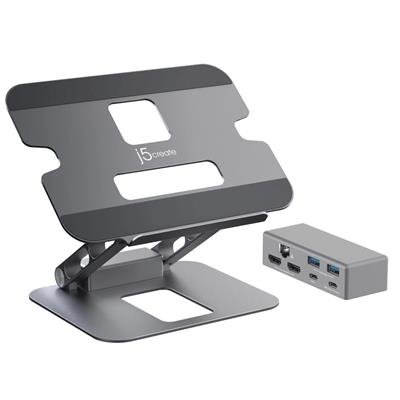
The J5CREATE JTS427 Multi-Angle Dual HDMI Docking Stand combines an adjustable aluminium laptop stand with a detachable USB-C mini-dock, helping keep cables tidy while expanding connectivity for a laptop or tablet. The dock supports a single 4K HDMI display or two 1080p HDMI displays, and offers Ethernet and USB expansion to build a compact desktop-style workstation. ([info.j5create.com](https://info.j5create.com/products/jts427?utm_source=openai))
Key features
- Integrated USB-C mini-dock with 2× HDMI outputs (4K single / dual 1080p dual-display mode). ([info.j5create.com](https://info.j5create.com/pages/jts427-specifications?utm_source=openai))
- USB-C port: 5 Gbps data and Power Delivery (PD) pass-through up to 100 W. ([info.j5create.com](https://info.j5create.com/pages/jts427-specifications?utm_source=openai))
- Two USB-A downstream ports (5 Gbps) for peripherals. ([info.j5create.com](https://info.j5create.com/pages/jts427-specifications?utm_source=openai))
- Gigabit Ethernet for wired network access. ([info.j5create.com](https://info.j5create.com/pages/jts427-specifications?utm_source=openai))
- Durable aluminium stand with multi-angle adjustment; supports laptops up to approximately 16 inches. ([jp.j5create.com](https://jp.j5create.com/products/jts427?utm_source=openai))
Who it suits
This product is aimed at users who want a neater desk setup and more ports from a single USB-C connection — for example hybrid workers, remote professionals or students who need extra displays, wired networking and USB ports while improving laptop ergonomics. Note that to drive external displays you generally need a host with USB-C or Thunderbolt that supports DisplayPort Alt Mode (and MST where applicable). ([info.j5create.com](https://info.j5create.com/pages/jts427-specifications?utm_source=openai))
Reviews
There are no reviews yet.